LightKeeper PRO
LightKeeper PRO

A secure platform for providing web hosting

We deploy LightKeeper PRO on your company's servers. You use it to provide hosting to your customers: you manage domains, websites, mailboxes and databases, while the system continuously watches for attacks on websites, spam, and compromised WordPress and Joomla installations.

This is not a hosting service, but the software you run one with. From the makers of ISPadmin, developed in the Czech Republic since 2003.

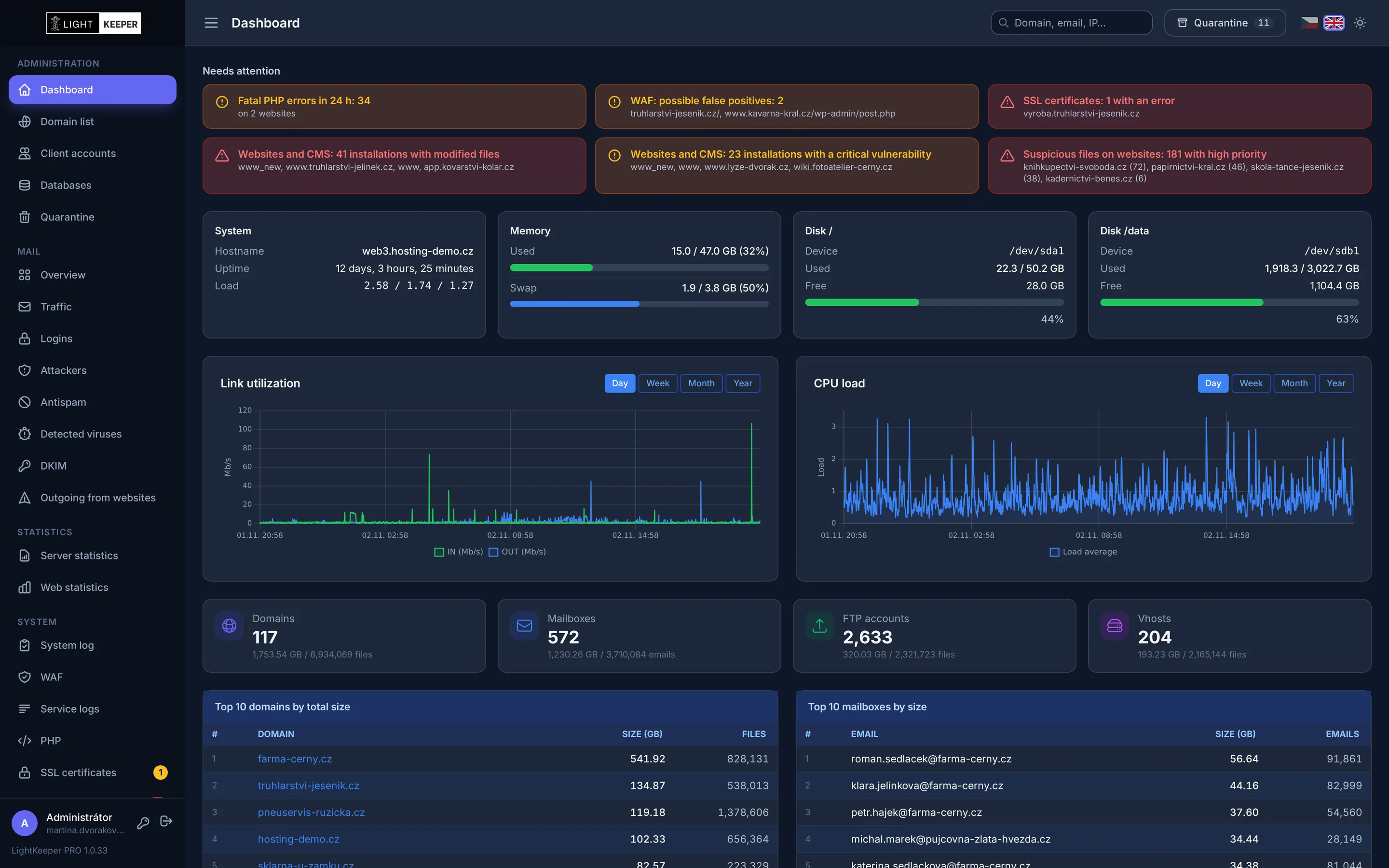
LightKeeper PRO Dashboard: alerts about compromised websites, vulnerabilities and PHP errors, server status and load
What LightKeeper PRO is

A complete system for your hosting, deployed on your servers

We don't rent out web space. We supply the system you use to provide hosting under your own name. We tailor the scope of the deployment to your infrastructure.

For your servers

Monitored web and mail servers

Apache with PHP-FPM and a WAF, mail with Postfix, Dovecot, rspamd and ClamAV, MariaDB databases. Everything configured so the services and the administration work together.

For your technicians

Administration and security overviews

Management of domains, websites, mailboxes and databases, overviews of attacks, spam and compromised websites, and alerts about anything that needs attention.

For your customers

Client portal

Your customers manage their own mailboxes, aliases, FTP and websites, within the scope you allow them. They can also sign in with a passkey.

Layers of protection

Every request and every message passes several checks

The layers build on one another. What gets past one is caught by the next, and everything is recorded in overviews where you can look up a specific IP address, website or mailbox.

Website request HTTP / HTTPS

  1. Fail2ban

    An IP that keeps attacking is blocked on the firewall. Repeat offenders for a week.

  2. WAF

    ModSecurity with OWASP CRS rules stops SQL injection, XSS and known exploits.

  3. Isolated PHP pool

    Each website runs in its own process with access restricted to its own files.

  4. No PHP in uploads

    A file uploaded to an images or cache folder won't execute.

  5. Nightly scan

    Core and plugin integrity, heuristics on every PHP file, and known vulnerabilities.

Incoming email SMTP

  1. Firewall and DNSBL

    Connections from blacklisted addresses are rejected before the message is accepted.

  2. Postfix checks

    Nonexistent recipients, forged HELO and invalid senders are stopped right away.

  3. Antispam

    rspamd with Bayes and fuzzy hashes scores the message; spam is only tagged.

  4. Antivirus

    ClamAV scans the entire message including attachments, tags a virus with [VIRUS] in the subject, and every detection shows up in the overview. Nothing gets lost.

  5. Delivery and statistics

    The message is delivered, and you'll see a record of it in the domain and mailbox statistics.

Website protection

A web application firewall for all websites at once

Every customer website sits behind the WAF from day one. Attacks aren't just stopped silently in the background: you see who is attacking, which website, under which rule, and from where.

  • ModSecurity and OWASP CRS in blocking mode, with rules updated automatically.
  • Gradual rollout: a problematic website stays in detection-only mode while the others block.
  • Fail2ban builds on the WAF: a repeat attacker gets banned on the firewall, and you can unblock with a single click.
  • Overviews by website, IP address, rule and country of origin. For every event you see why it was blocked.
More about website protection →
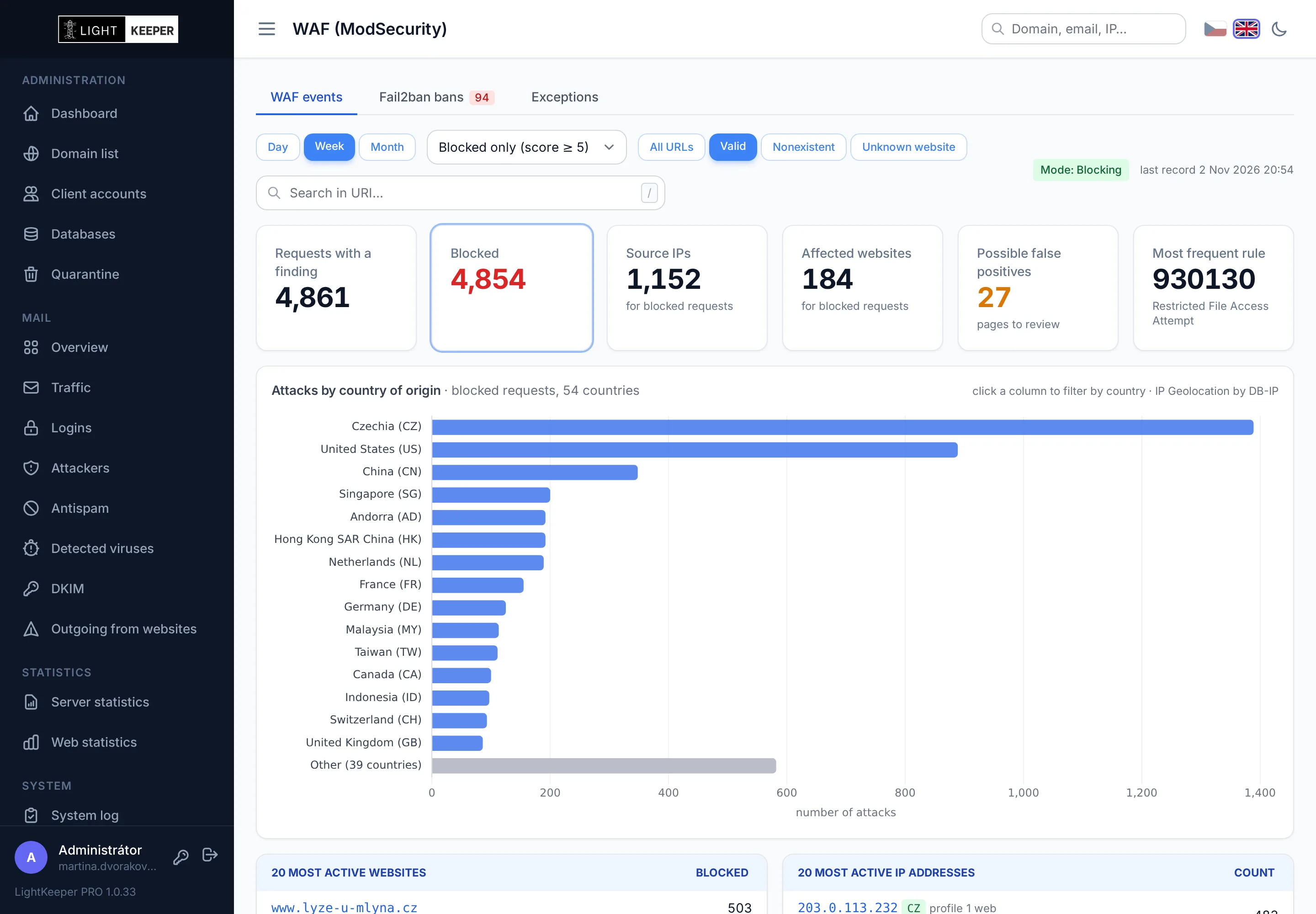
WAF overview: blocked attacks, countries of origin, most active websites and IP addresses
Compromised website detection

Finds a web shell before the website starts sending spam

Every night, all websites are scanned. WordPress and Joomla are compared against the original packages, every PHP file goes through heuristics, and new or changed files are recorded. Customer website code is never executed in the process.

  • Core and plugin integrity against official checksums, with a diff against the original right in the overview.
  • Heuristics on every PHP file, even on websites without a CMS: eval, encoded payloads, hidden file uploads and obfuscated JavaScript.
  • Vulnerabilities and end of support for core, plugins and themes, based on the versions actually present on the website.
  • Change tracking by ctime, because malware routinely forges the modification time (mtime).
  • Reviewed: check off a file once you've verified it. If its content changes again, it returns to the alerts.
≈ 400,000PHP files in under 2 minutes
40 / 40malware samples from real incidents detected
0false positives on 124,000 verified files
How detection works →
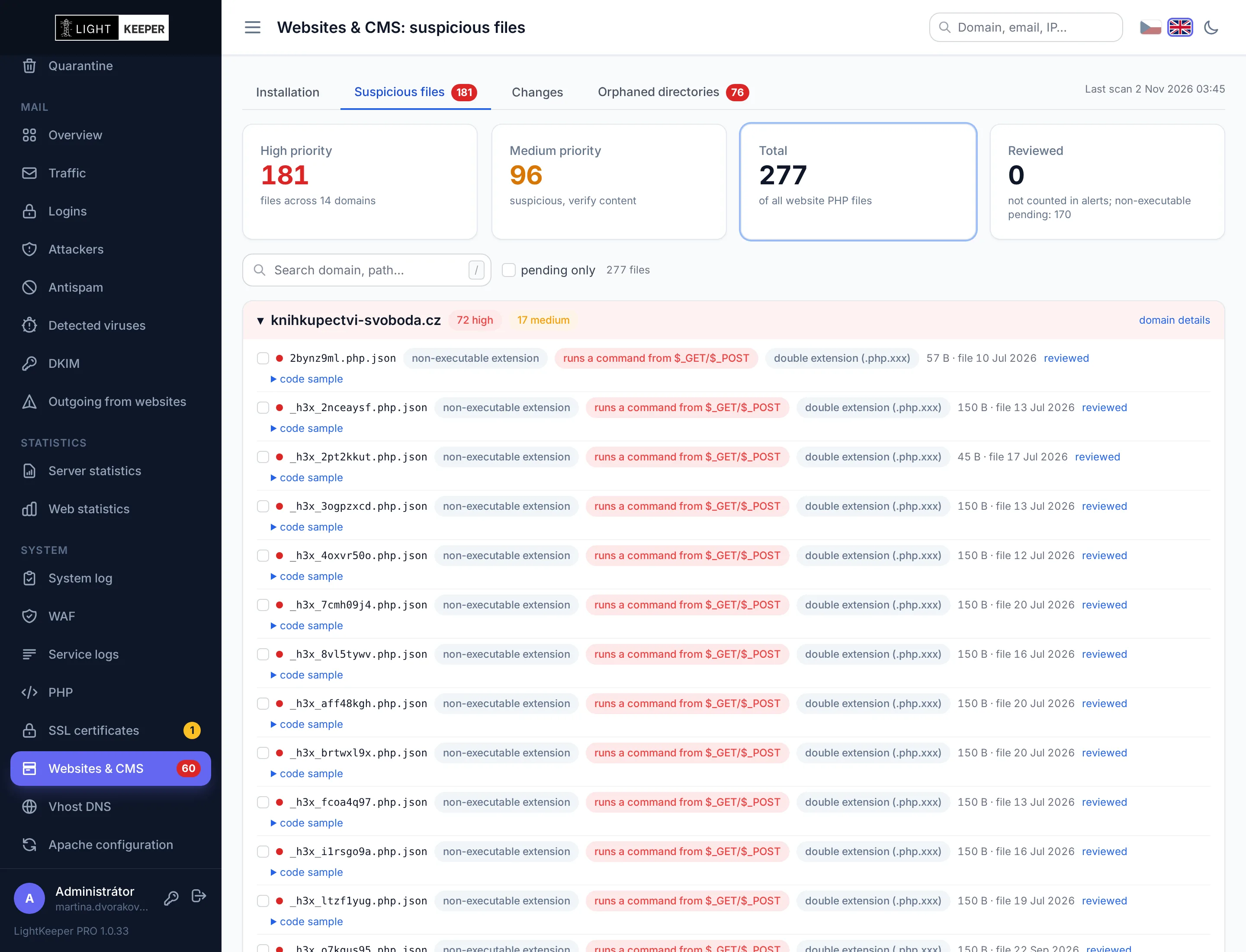
Suspicious files on websites sorted by priority
Mail and antispam

Stops spam at the door, but never loses an email

Most unsolicited mail is rejected before it is even accepted. Whatever gets through is scored and tagged by the antispam. Messages are never deleted or silently discarded, so a customer won't miss an invoice because of an overly strict filter.

  • Rejected before antispam: blacklists, nonexistent recipients and the firewall. Overview by reason, sender and target domain.
  • rspamd with learning (Bayes, fuzzy hashes) and ClamAV antivirus. Per-domain antispam settings.
  • Mailbox monitoring: password attacks over SMTP, IMAP and POP3. An alert when someone signs in after a series of failures.
  • Spam from websites: when a customer website starts calling mail() en masse, you get an email naming the specific script.
More about mail and antispam →
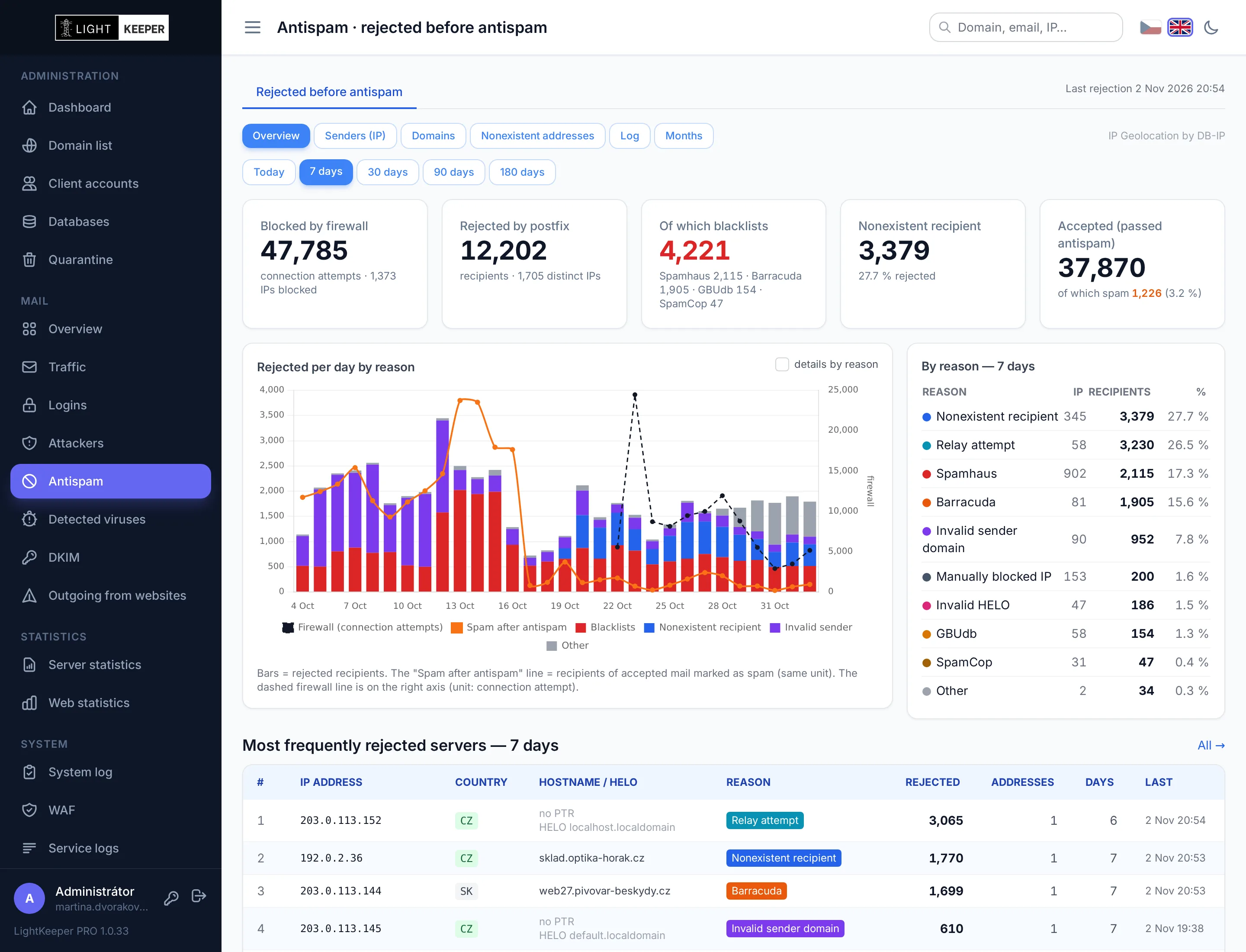
Mail rejected before antispam, by reason
SSL certificates

No certificate expires unnoticed

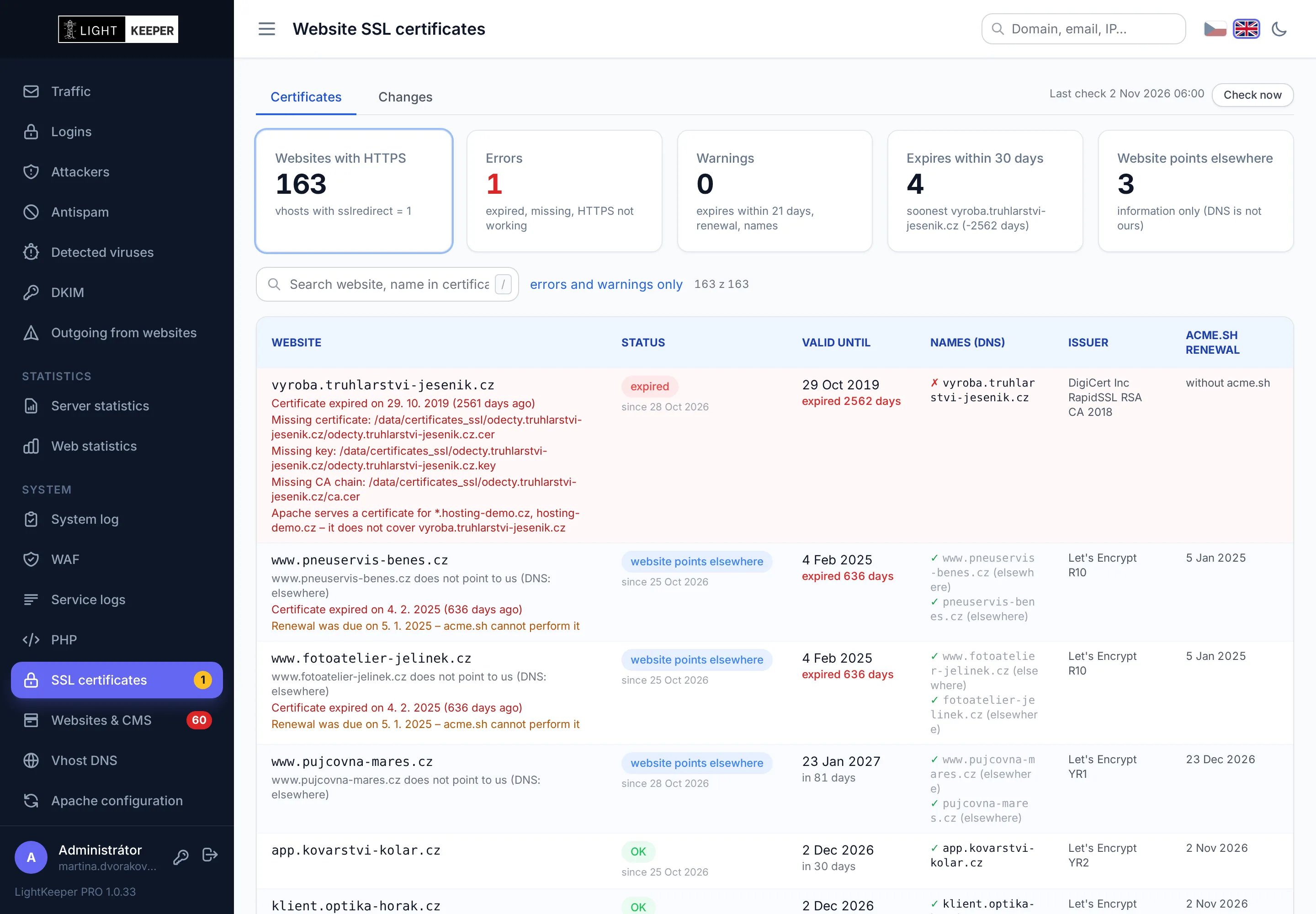
A certificate is key to a secure website, so every morning the system checks it on all websites, just as a visitor's browser would. That way you see the problem, not your customer in a browser warning.

  • Live HTTPS check for every website name, with and without www, including aliases. Verified the same way a browser does it.
  • Renewal check: detects a certificate that isn't renewing automatically, as well as a renewal that should have happened and didn't.
  • Only websites that point to you. When a customer moves a website elsewhere, the system doesn't report needless errors for it.
  • Email alerts on status changes, plus a Monday summary. You set the "expiring soon" threshold; the default is 21 days.
Everything the certificate check detects →
SSL certificate check for all websites
Reliable operation

Nothing gets lost, and you know about everything

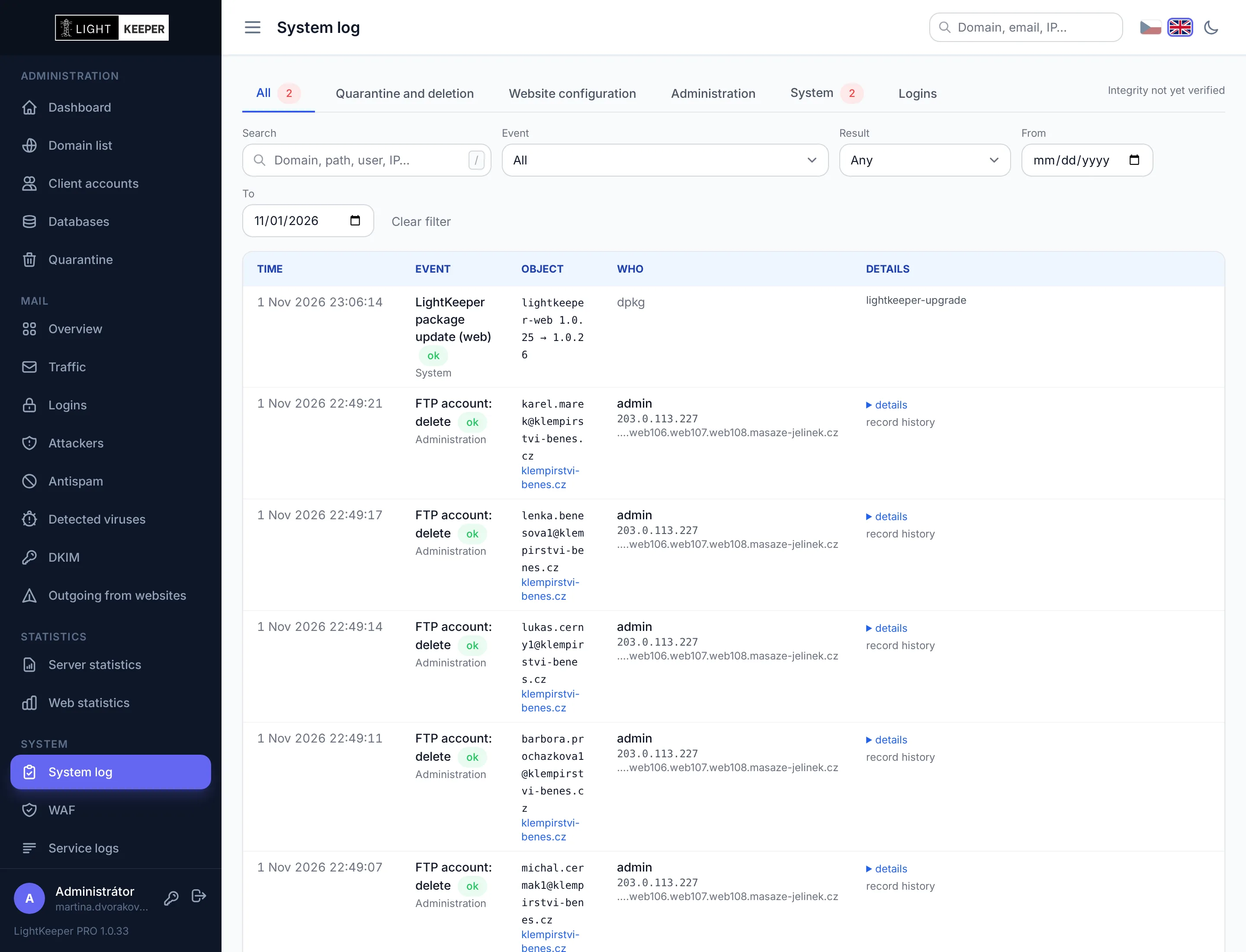
A technician's mistake or a forgotten nightly job doesn't have to end in data loss. Deleted items are kept in quarantine, every change is logged, and the system monitors itself too.

  • 30-day quarantine: restore a deleted domain with all its websites, mailboxes and databases in one click.
  • System log with the old and new value of every change, whether it was made by a technician, a customer or the system.
  • Monitored background jobs: a job that failed or never started is reported by email.
  • Server configuration within a minute of a website change, always validated first. An error never gets deployed.
How LightKeeper PRO protects your operations →
System log: changes with old and new values, who made them and with what result
Management and overview

System modules

Monitoring is built on top of everyday hosting management. You manage domains, mailboxes, websites and databases in one place, and your customers get their own portal. The system tour shows what it really looks like.

Hosting management

Everything you create and change for your customers. Directories, PHP pools and server configuration are set up automatically.

Domains and websites

Domains, virtual hosts and FTP accounts. The system generates the Apache and PHP configuration and validates it before deployment.

  • PHP 5.6 to 8.5 per website; older websites can run in compatibility mode
  • a dedicated PHP-FPM pool for each website, with memory and process limits
  • warnings when changing the PHP version: limits, short_open_tag, migrating from PHP 5 to 7+
  • the mail() function can be disabled for a specific website
  • changes are applied on the server automatically within a minute; a faulty one isn't deployed and the server keeps running on the last working configuration

Databases

Customer MariaDB and MySQL databases on one or more database servers.

  • create a database with a user, change passwords, assign an owner
  • records compared with the actual server state every 15 minutes
  • alerts about databases that are on record but missing on the server, and vice versa
  • a deleted database is kept in quarantine for 30 days, including users and privileges; restore in one click

Mailboxes and aliases

Mailboxes, aliases and forwarding. Changes take effect in the mail system immediately.

  • mailboxes with securely stored passwords (new and changed ones as SHA-512)
  • aliases with multiple recipients; for each you see 30 days of mail and a "forwards externally" label
  • RFC 3834 auto-reply that doesn't respond to bots or mailing lists
  • per-domain antispam: tag spam or move it to the Junk folder, sender whitelist and blacklist
  • an email when a mailbox starts sending mail after its password has been stolen

SSL certificates

Let's Encrypt certificates straight from the website form, no command line required.

  • before issuing, verifies which website names actually point to your server
  • after issuing, can immediately enable redirection to HTTPS
  • checks the validity, covered names and certificate chain of every website daily
  • deploys renewals safely: on error it restores the original configuration and Apache doesn't go down
Monitoring and statistics

Figures from server and mail logs, grouped so you can reach a specific website or mailbox in a few clicks.

DNS monitoring

Every day it checks where website names and domain MX records actually point.

  • status of every name: points to you, partially, elsewhere, no record, doesn't exist
  • an email the moment a customer's website or mail moves elsewhere or comes back
  • change history and export, verification even for wildcard names
  • a DNS resolver outage doesn't overwrite the last known state

Web statistics

Traffic for every website from the server logs. No tracking code needs to be added to the website.

  • unique visitors, visits, page views and data transferred
  • most-viewed pages, traffic sources, browsers, operating systems and distribution over the day
  • over 70 kinds of bots in categories: search engines, SEO, AI crawlers, monitoring, scanners
  • charts by hour, day and month, 13 months of history, 90 days of details

Mail statistics

Mail for the whole server, from the yearly overview down to individual messages in a single mailbox.

  • year, month, day, domain, mailbox and message, always with a chart and a table
  • delivered, spam and viruses, data volume, mail to aliases and to nonexistent addresses
  • outgoing mail by mailbox, and today's activity for the whole server on one page
  • for every day and domain, the number of messages rejected before antispam
  • closed periods load instantly from daily summaries

PHP errors and mail from websites

What customer websites write to the error log and how much mail they send through PHP.

  • errors by website and level: fatal, parse, warning, deprecated, notice
  • full-text search and grouping of recurring errors
  • every mail() call is recorded, including the script that sent it
  • an email when a website exceeds the configured number of messages per hour
Operations and access

Server status, traceable operations, and access for administrators and customers.

Server and PHP-FPM

Server load and PHP pool utilization, so you can tell which website is slowing the server down.

  • CPU, memory and disks minute by minute
  • disk usage of every website, mailbox and FTP account, recalculated hourly
  • hourly pool utilization: average, maximum, minutes at the limit, queue
  • an alert when a website runs out of its allowed number of processes

Service logs and system log

Who signed in, when and from where, what changed, and what the system did on its own.

  • FTP, IMAP, POP3 and SMTP logins and sent messages, 90 days back
  • for each mailbox, an overview of the locations it usually signs in from, and sign-ins from abroad
  • system log: every change with the old and new value, who made it and with what result
  • records protected against silent tampering by checksummed copies
  • search by IP, mailbox, domain or user

Client portal and sign-in

Customers manage their own services, but only within the scope you allow.

  • per-domain permissions: mailboxes, aliases, antispam, FTP and websites
  • domain status, PHP errors and the actual certificate status of every website
  • passkeys: Touch ID, Face ID, Windows Hello, a phone or a YubiKey
  • changing the password invalidates remembered sign-ins on other devices
  • an email on password change and when a new passkey is added

Dashboard and alerts

The home screen shows only what needs attention right now.

  • compromised websites, vulnerabilities, certificates, DNS, full disks and databases
  • monitors itself too: stalled data collection or a scheduled job that didn't run
  • custom recipients and thresholds for each alert type, clear emails
  • light and dark mode; the entire administration works on mobile and can be added to the home screen as an app
How it's built

Principles we don't compromise on

No email ever gets lost

Spam is tagged and delivered, never deleted or silently discarded. If a technical error occurs, the message is deferred and delivered later instead of bouncing back to the sender.

Website scans never execute website code

Versions, plugins and malware are identified by reading files and comparing them with the originals. A compromised website can't fool or exploit the scan.

Administration separated from the server

The web interface runs under its own unprivileged user. For operations that require server administrator privileges, the system verifies them itself from the database and never trusts input from the web.

Deleted items can be restored for 30 days

A deleted domain, mailbox or database is moved to quarantine. Within 30 days you can restore it to its original location in one click, including settings and passwords.

Every change is traceable

The system log records who changed what, from where, and what the original value was. The records are protected by checksummed copies, so they can't be silently altered.

Customer websites are isolated from each other

A dedicated PHP process, restricted file access and locked shared pools. A compromise of one website doesn't spread to its neighbors.

Built on

ModSecurityOWASP CRSrspamdClamAVfail2banPostfixDovecotMariaDBLet's EncryptDebian
News

What's new

News

Quarantine, DKIM and Mail Queue: What's New

Deleted data in quarantine for 30 days, a system log with original values, DKIM signing, SPF/DKIM/DMARC checks for all domains and a mail queue in the admin.

News

Introducing the New LightKeeper PRO

After the critical PHP2Shell flaws: the new LightKeeper PRO brings hosting-wide security, problem prevention and detailed overview. Migration with your data.

All news →
Contact

We'll show you the system on live data

Do you run a web hosting business and want visibility into attacks, spam and compromised websites? Schedule an online demo. We'll walk you through the administration and discuss how LightKeeper PRO would fit into your infrastructure.

NET service solution, s.r.o.
Address
Žerotínova 3056/81a
787 01 Šumperk
Czech Republic
Email
sales@net-service.cz
Company ID
27849252
VAT ID
CZ27849252