LightKeeper PRO / Certificates
SSL certificatesNo certificate expires unnoticed
A certificate is the key to a secure website. It encrypts the connection with visitors and proves the website really is what it claims to be. When it is missing or expired, the browser shows a warning instead of the page. That's why LightKeeper PRO monitors it on every website every day and alerts you before your customer notices a problem.
Verifies a website just like a visitor's browser
The check connects to every website over HTTPS, separately for each hostname, and verifies the certificate a real visitor receives: whether it is valid, matches the hostname and has a complete chain of trust. It also makes sure the certificate is renewed automatically and on time.
- All of a website's hostnames, with and without www and including aliases, compared against DNS: only hostnames that actually point to you are reported.
- Working renewal: detects a certificate without automatic renewal as well as a renewal that should have happened but didn't.
- Status change history and an email on every change, plus a Monday summary of everything that needs attention.
- Configurable threshold for “expires soon”; the default is 21 days.
Without a valid certificate, a website doesn't work for visitors
Encryption and trust
A certificate protects passwords, forms and payments from eavesdropping and confirms to visitors that they are talking to the real website, not a fraudster.
A warning instead of the page
The browser blocks an expired or invalid certificate with a full-screen warning. Most visitors leave at that point, and the customer calls you.
Renewal can break
Let's Encrypt certificates are valid for 90 days and renew automatically. A single DNS or configuration change is enough for renewal to stop working without anyone noticing.
What the check detects
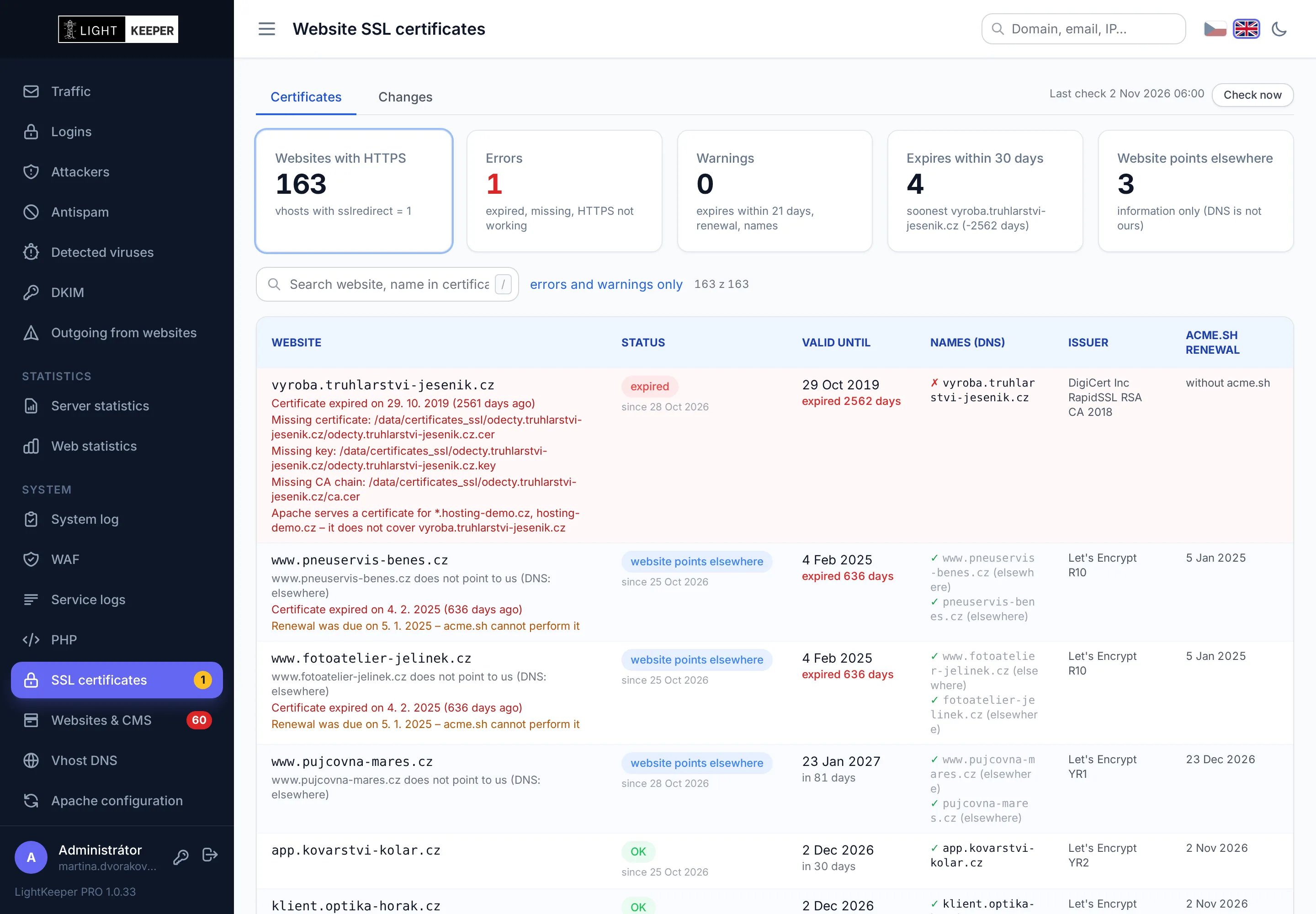
- expired
- The certificate has expired. The check shows when and how many days ago.
- certificate missing
- The website has HTTPS enabled, but the certificate or its key is missing or corrupted.
- HTTPS error
- A browser would reject the certificate: incomplete chain, certificate for a different hostname, self-signed or not yet valid.
- expires soon
- Fewer days remain until expiration than the configured threshold.
- renewal not working
- The certificate has no automatic renewal configured, or a renewal should already have happened and didn't.
- Apache serves old one
- The certificate has been renewed, but the server still sends visitors the previous one.
- hostname not covered
- One of the website's hostnames, such as the variant without www, points to you, but the certificate doesn't cover it.
- non-standard renewal
- The Let's Encrypt validation directory is missing or located somewhere other than expected. The next renewal would fail.
From issuance to renewal
- Issuance
With a button in the website form. The system first verifies which hostnames point to your server and tests the validation file so it doesn't needlessly use up Let's Encrypt rate limits.
- Safe deployment
Certificate, key and chain check, configuration test and reload. Finally, it verifies that the server is sending the new certificate. If anything fails, it restores the previous state.
- Automatic renewal
Runs at night. Multiple renewals are combined into a single server reload.
- Morning check
After the nightly renewals, it verifies HTTPS on all websites and records status changes in the history.
- Alerts
An email, an item on the dashboard and the status right in the website form, with a button for an immediate check.
A website without a usable certificate temporarily runs on HTTP only. A faulty certificate on one website never brings down the web server for the others.
A certificate with one click, no command line
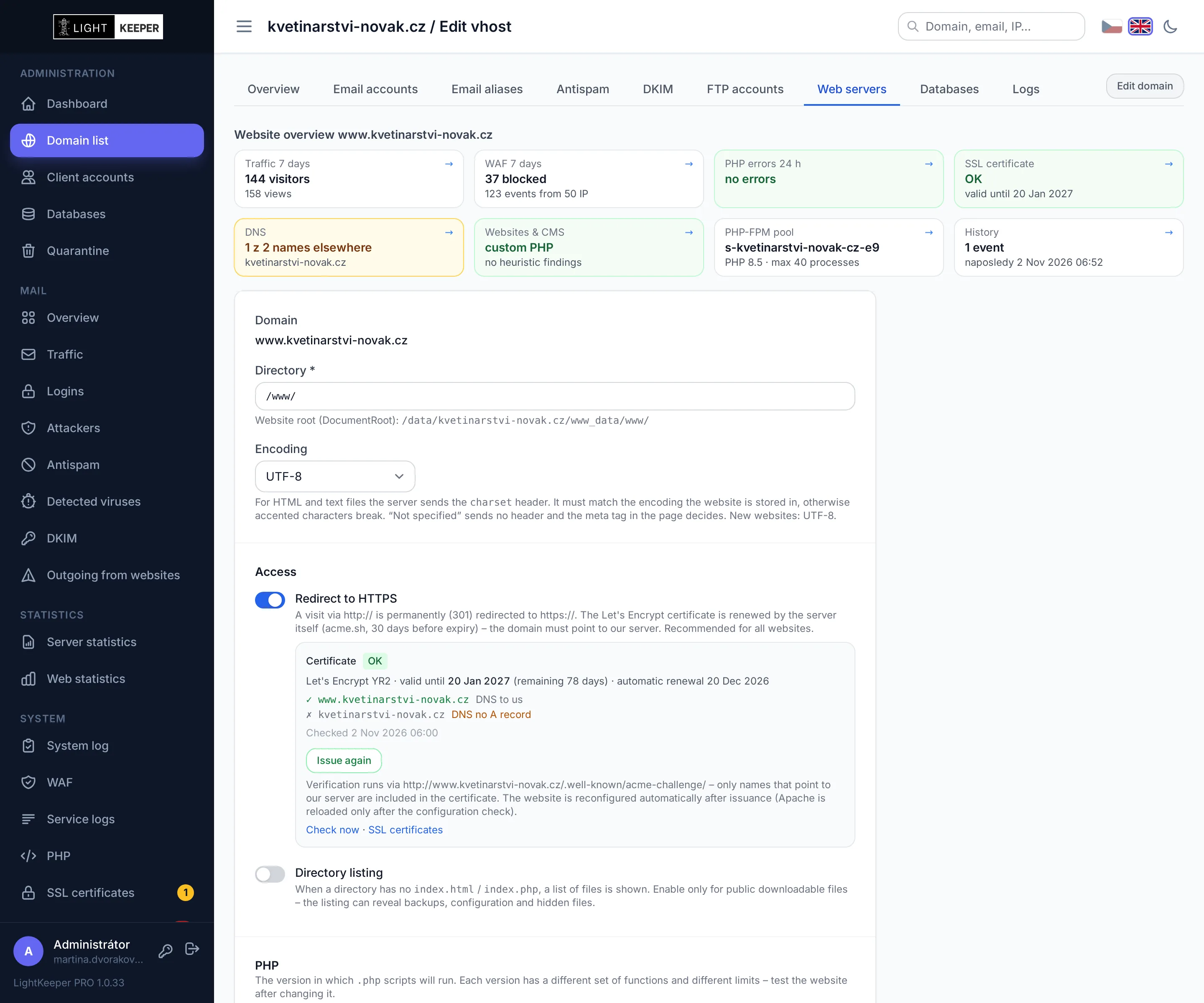
In the website form, the administrator sees the certificate status, the hostnames it covers and where they point in DNS. One button issues or renews the certificate, and HTTPS redirection can be turned on right away.
- Before issuance, it verifies DNS and tests the validation file so Let's Encrypt rate limits aren't used up needlessly.
- After issuance, it checks the certificate, key and chain, tests the configuration and verifies that the server is sending the new certificate. If anything fails, it restores the previous state.
- Actual status in the website list: instead of a plain “HTTPS yes/no,” the list shows whether the certificate is valid, expires soon or has a problem. Customers see the same in the client portal.